


|
|
CrowPanel 1.28inch-HMI ESP32 Rotary Display |
x 1 |

|
Soldering Iron Kit |
|

|
arduino IDEArduino
|
DIY Smart Code Lock with CrowPanel 1.28 ESP32 Rotary Display
A code lock is a keyless security device—either mechanical or electronic—that restricts access to doors, lockers, or cabinets using a preset numerical code entered via a keypad. They eliminate the need for physical keys, allow for quick code changes, and can range from simple push-button mechanical models to advanced, smart-enabled devices.
This time I will show you the simplest possible way to make such an advanced device, at the same time incredibly simple thanks to the beautiful CrowPanel 1.28 inch-HMI ESP32 Rotary Display. In one of the previous videos) I presented you a way to make a variable frequency oscillator with this small display and there all its features and functions are described.
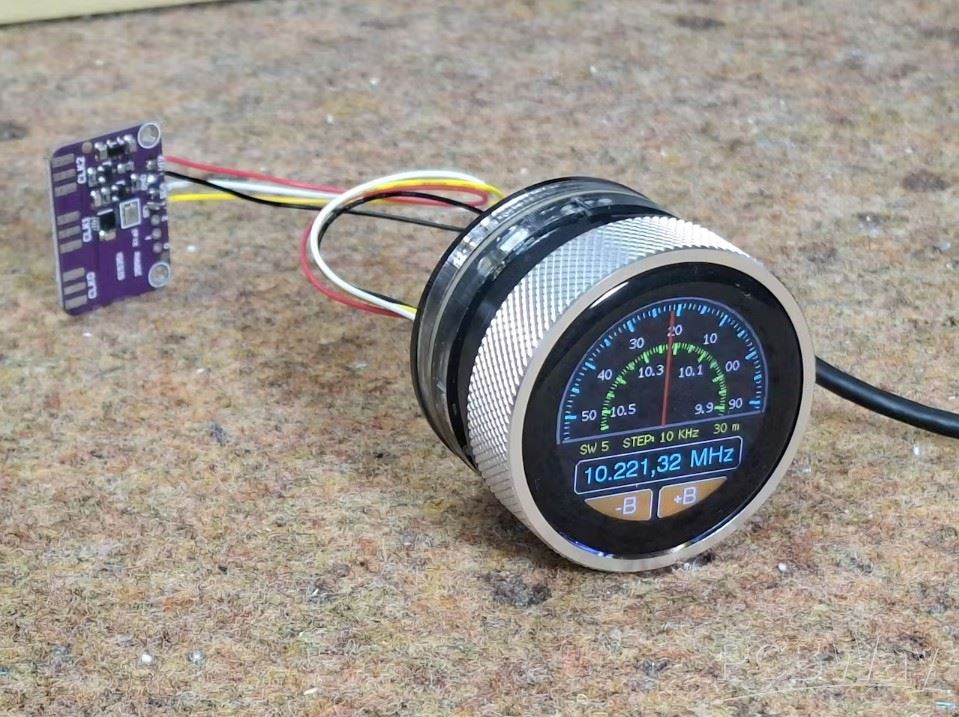
In addition to the touch function and button, this module also contains a rotary encoder which makes it ideal for the device described in this video. Also, the Access Point function of the ESP32 MCU allows us to control it via Wi-Fi with a Smartphone.
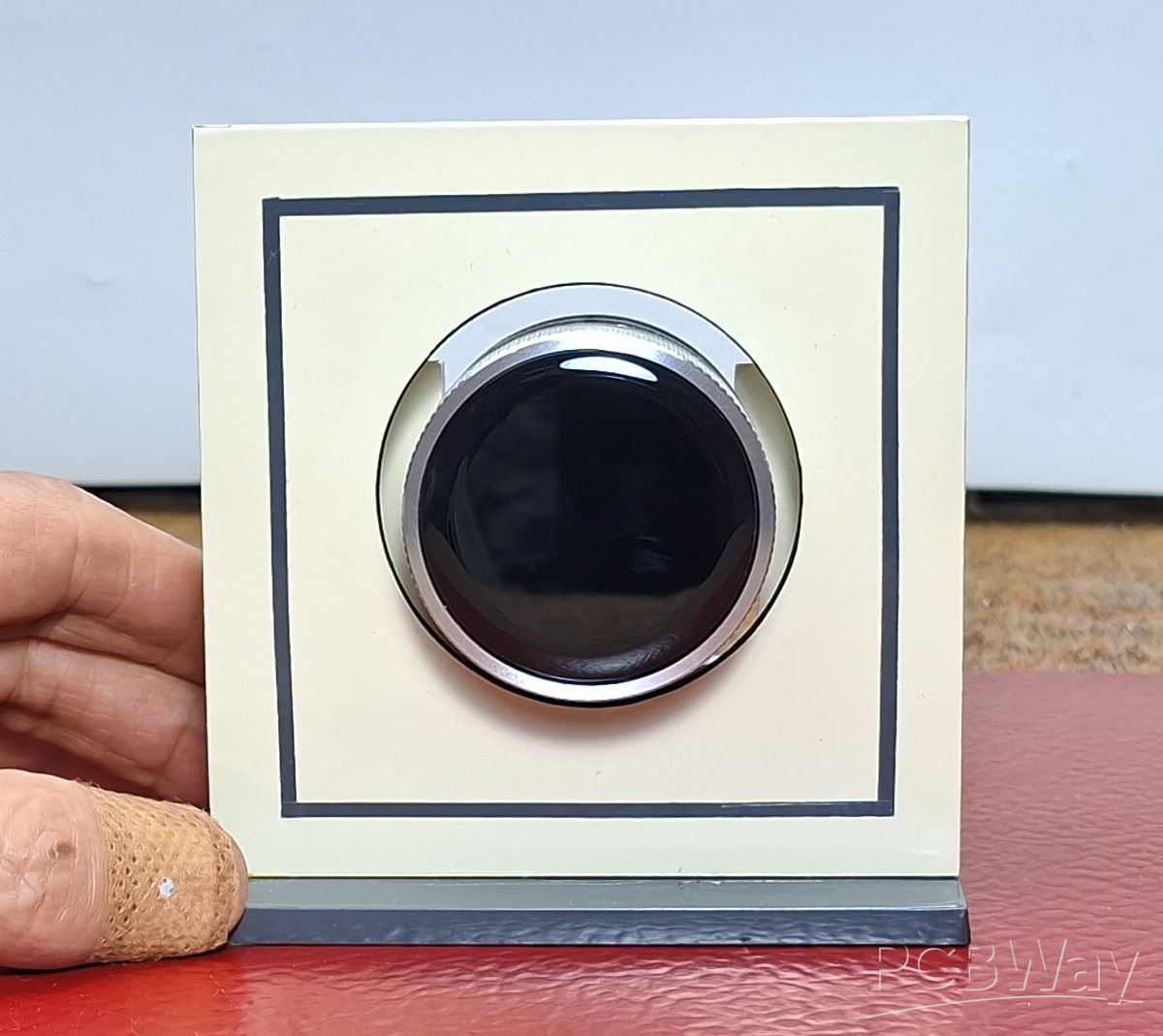
As I mentioned earlier, in this particular example I am using only a Crowpanel round display and will focus on the software part, which also means that there will be no need for soldering and connecting external components. However, in the case of a real lock, an I2C controlled relay or an I2C port expander with a standard relay should also be installed. For better visibility, the display module is mounted on a small PVC housing covered with self-adhesive wallpaper.
Let me not forget to mention that this is actually a final exam project of a student from a vocational high school under my mentorship. In fact, my part of the code is only a small modification of the library as well as the way the display is initialized and managed. The remaining functional part of the code was completely developed by the student using the Free AI client.
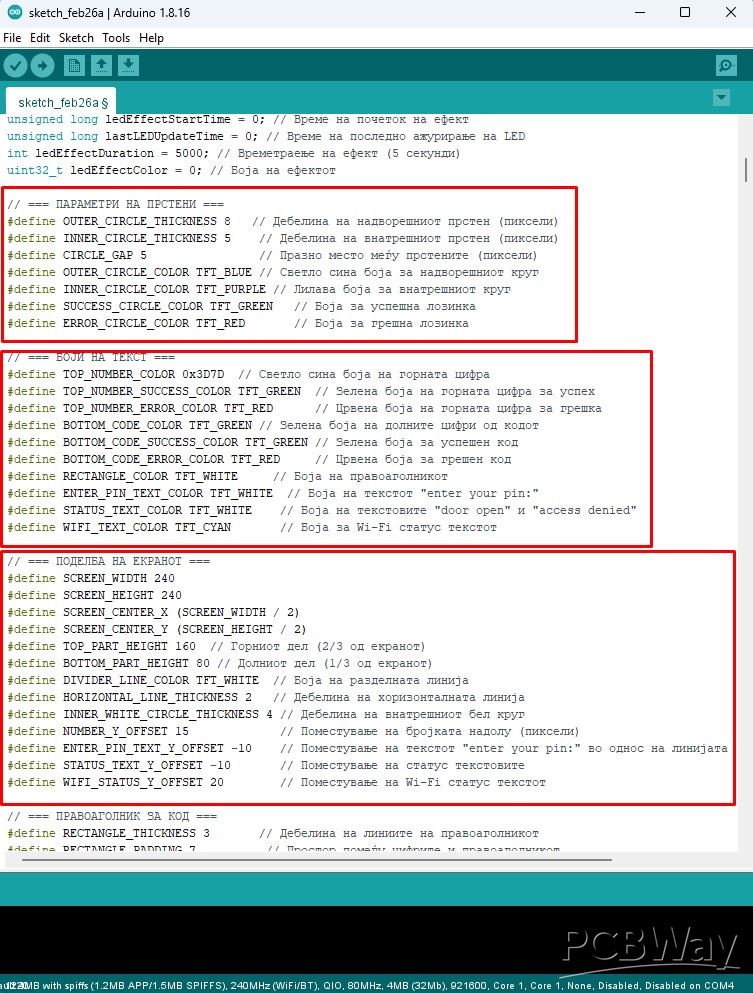
It is important to emphasize that in order to compile the code without errors, you need to use ESP32 Core V 2.0.14 along with the provided libraries, and I specifically used Arduino IDE version 1.8.16. Otherwise, from the very beginning, the idea was to develop the code in a way that in the future we could very easily change many of the parameters that were defined at the beginning.
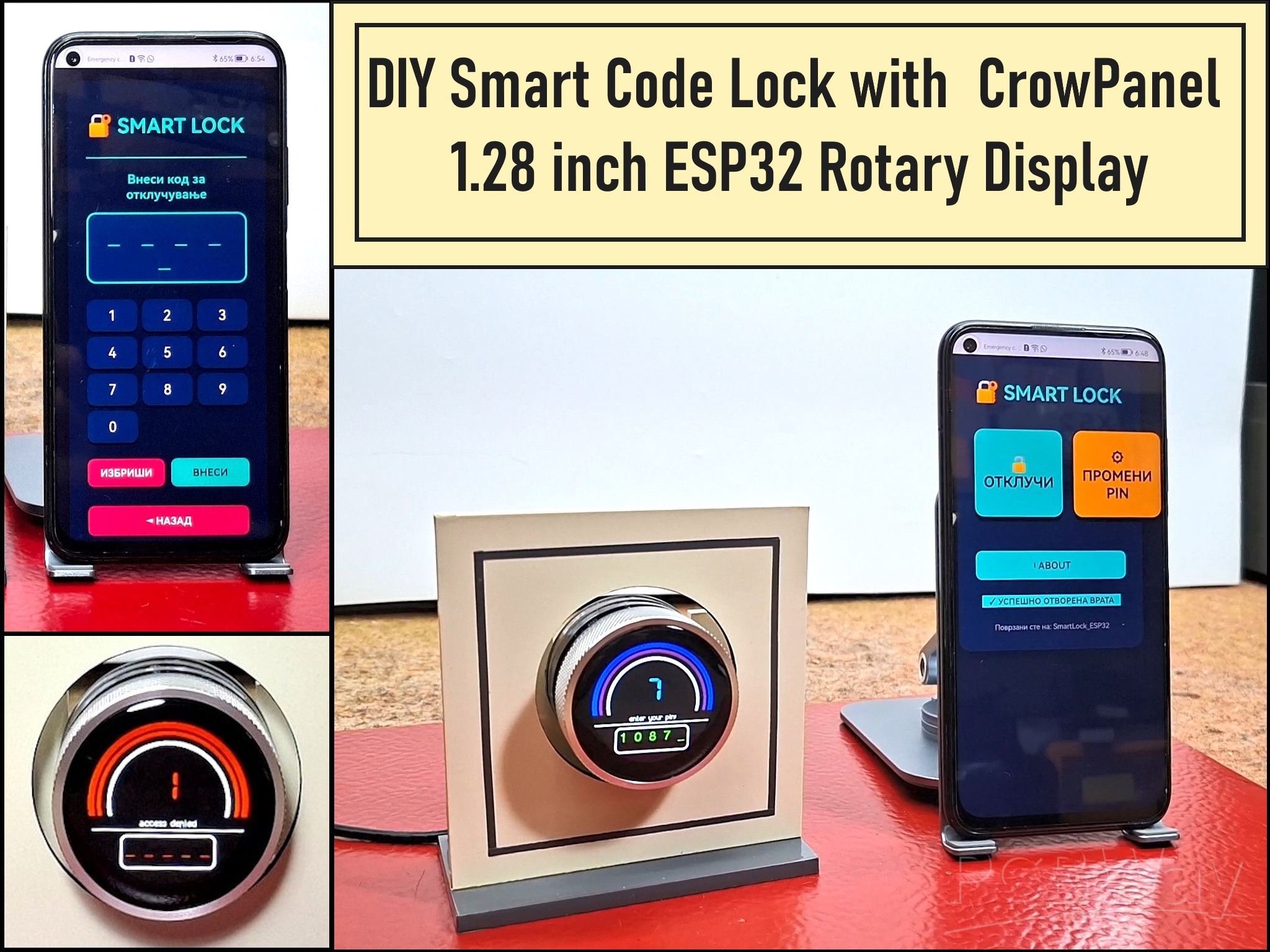
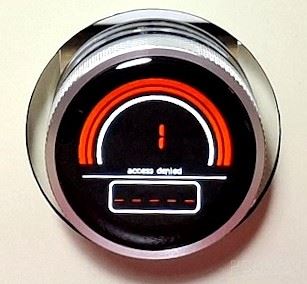
Now let's see how this device works in real conditions. When the lock is turned on, the image appears on the display, which is divided into two parts. In the upper part, the specific number is entered, and the lower half is reserved for the complete password. In this demo case, the entered password will be visible, otherwise in real use only asterisks would appear here. We select the number by turning the rotating display, and confirm it by pressing the button. If we enter the wrong password, the frame around the number lights up red for the next 5 seconds, the display says Wrong Password, and a red LED rotates in the background around the display.
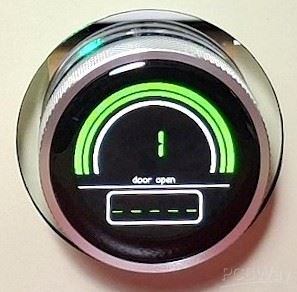
Conversely, if the password is entered correctly, the frame lights up green, a message on the display for the correct password, and a green LED rotates in the background of the display. During this Green period of 5 seconds, we have the opportunity to open the door. In a real case, by activating the green LED, a relay was also activated that unlocked the door.
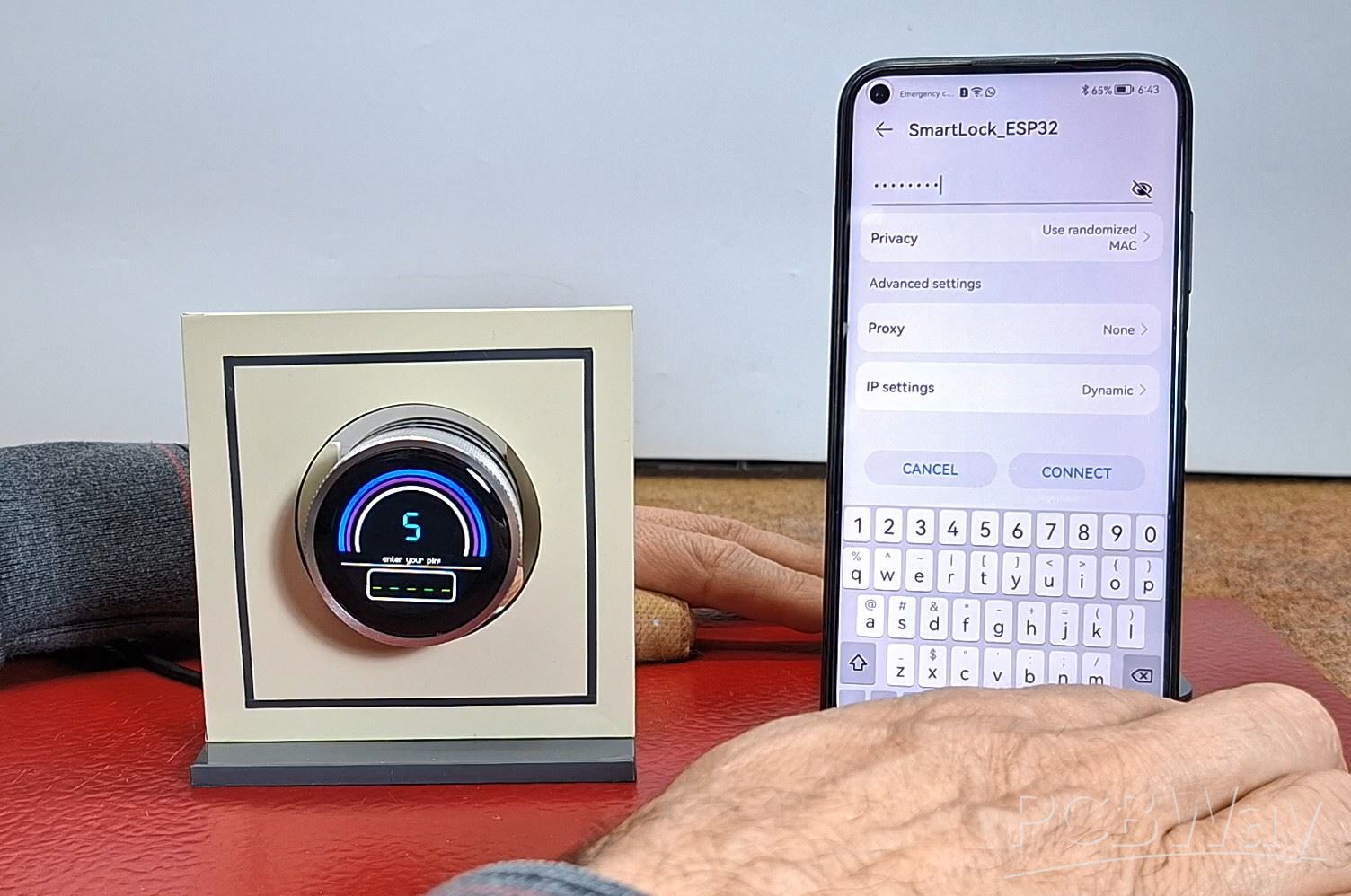
I also mentioned that we will use the access point option of the ESP32 microcontroller, which makes this lock a Smart device. The code has created a simple web interface through which the lock can be controlled. First, we need to connect to the Wi-Fi network with the name "SmartLock_ESP32" and the password "12345678" with a smartphone (we define these credentials in the code).
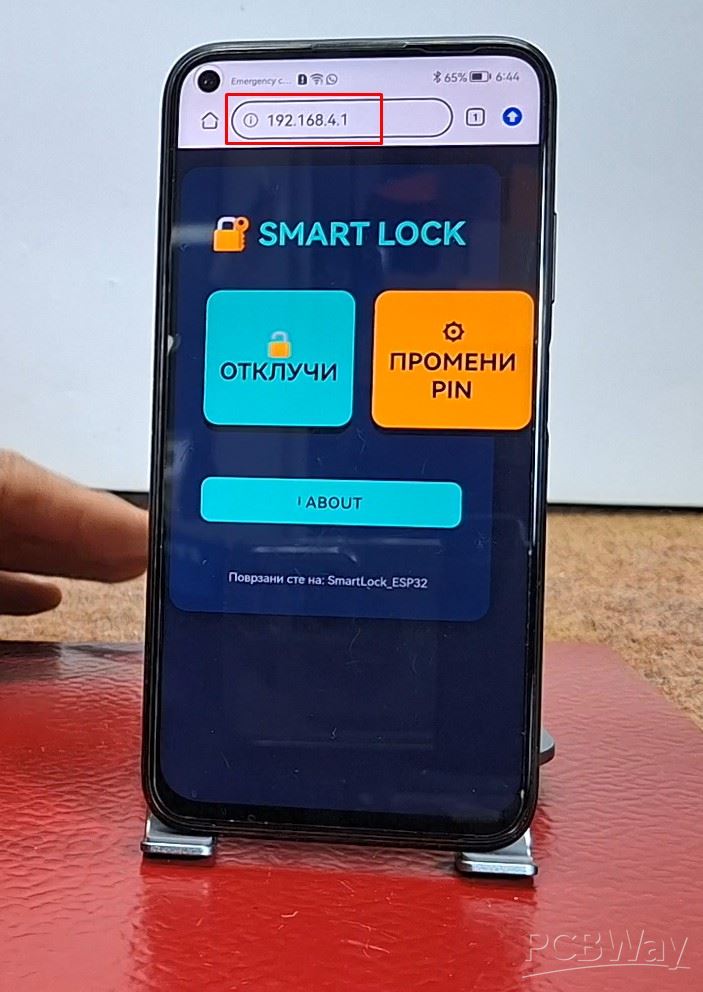
Then we enter the address 192.168.4.1 in the web browser and by opening this address a beautiful control interface appears. Here, at the beginning, we can choose one of the two offered options: to open the lock, or to change the master password.
If we enter "open lock", a keyboard appears through which we need to enter the code. The same signaling applies here as with mechanical entry as far as colors are concerned. If we want to change the master password, we enter the change password menu.
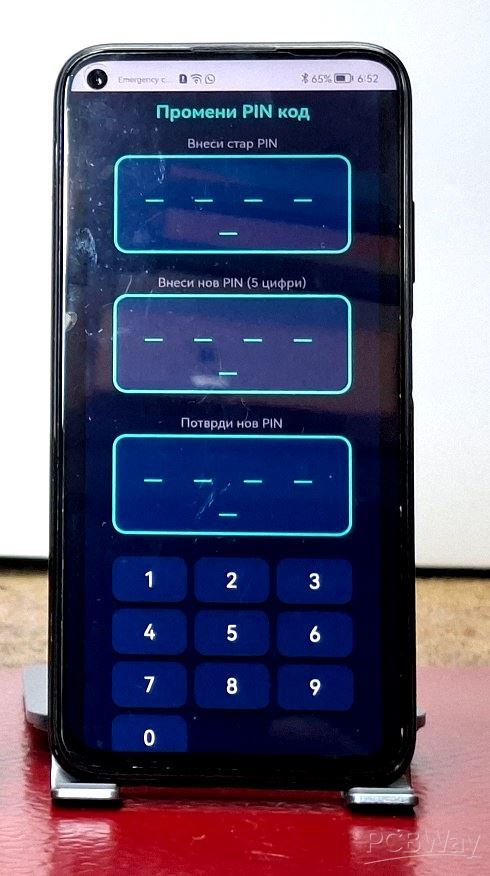
There we have the option to first enter the existing password, and then we need to enter and confirm the new changed password. If the existing password is entered correctly, the successful password change will be signaled by a circular movement of the blue LED in the background of the display.
And finally a short conclusion. This project proves that with the right HMI hardware and a bit of coding, you can create a high-end security interface that rivals professional systems in both look and feel. It is a perfect example of how modern microcontrollers can simplify complex mechanical tasks into elegant digital solutions.
//KRAEN KOD SE ZAEDNO I EKRAN I TELEFON
/*
  CrowPanel 1.28" (ESP32-S3 + GC9A01, TFT_eSPI)
  Електронска брава со ротационен енкодер и WEB интерфе?с
  - Промена на лозинка преку веб
  - Зачувува?е во EEPROM
*/

#include <Arduino.h>
#include <TFT_eSPI.h>
#include <SPI.h>
#include <Wire.h>
#include <math.h>
#include <Adafruit_NeoPixel.h>
#include <WiFi.h>
#include <WebServer.h>
#include <EEPROM.h>

// === КОНФИГУРАЦИ?А НА EEPROM ===
#define EEPROM_SIZE 64
#define CODE_SAVE_ADDRESS 0  // Адреса каде ?е се чува кодот (5 ба?ти)

// === КОНФИГУРАЦИ?А НА ДИСПЛЕ? ===
#define USE_PANEL_ENABLE_PINS  1
#define PIN_LCD_PWR_EN1   1
#define PIN_LCD_PWR_EN2   2
#define PIN_TFT_BL        46
#define PIN_TFT_RST       14

// === КОНФИГУРАЦИ?А НА WI-FI ACCESS POINT ===
const char* ap_ssid = "SmartLock_ESP32";
const char* ap_password = "12345678";  // Минимум 8 карактери
IPAddress local_IP(192, 168, 4, 1);
IPAddress gateway(192, 168, 4, 1);
IPAddress subnet(255, 255, 255, 0);

WebServer server(80);

// === NEO PIXEL LED ===
#define LED_PIN 48          // Пин за LED лента
#define LED_COUNT 5         // 5 LED диоди
#define LED_BRIGHTNESS 50   // ?ачина (0-255)
#define LED_ROTATION_TIME 100  // Време на ротаци?а (ms) - секои 100ms се менува LED

Adafruit_NeoPixel strip(LED_COUNT, LED_PIN, NEO_GRB + NEO_KHZ800);
int ledPosition = 0;        // Тековна LED позици?а
bool ledEffectActive = false; // Дали LED ефектот е активен
unsigned long ledEffectStartTime = 0; // Време на почеток на ефект
unsigned long lastLEDUpdateTime = 0; // Време на последно ажурира?е на LED
int ledEffectDuration = 5000; // Времетрае?е на ефект (5 секунди)
uint32_t ledEffectColor = 0; // Бо?а на ефектот

// === ПАРАМЕТРИ НА ПРСТЕНИ ===
#define OUTER_CIRCLE_THICKNESS 8   // Дебелина на надворешниот прстен (пиксели)
#define INNER_CIRCLE_THICKNESS 5    // Дебелина на внатрешниот прстен (пиксели)
#define CIRCLE_GAP 5                // Празно место ме?у прстените (пиксели)
#define OUTER_CIRCLE_COLOR TFT_BLUE // Светло сина бо?а за надворешниот круг
#define INNER_CIRCLE_COLOR TFT_PURPLE // Лилава бо?а за внатрешниот круг
#define SUCCESS_CIRCLE_COLOR TFT_GREEN   // Бо?а за успешна лозинка
#define ERROR_CIRCLE_COLOR TFT_RED       // Бо?а за грешна лозинка

// === БО?И НА ТЕКСТ ===
#define TOP_NUMBER_COLOR 0x3D7D  // Светло сина бо?а на горната цифра
#define TOP_NUMBER_SUCCESS_COLOR TFT_GREEN  // Зелена бо?а на горната цифра за успех
#define TOP_NUMBER_ERROR_COLOR TFT_RED      // Црвена бо?а на горната цифра за грешка
#define BOTTOM_CODE_COLOR TFT_GREEN // Зелена бо?а на долните цифри од кодот
#define BOTTOM_CODE_SUCCESS_COLOR TFT_GREEN // Зелена бо?а за успешен код
#define BOTTOM_CODE_ERROR_COLOR TFT_RED     // Црвена бо?а за грешен код
#define RECTANGLE_COLOR TFT_WHITE     // Бо?а на правоаголникот
#define ENTER_PIN_TEXT_COLOR TFT_WHITE  // Бо?а на текстот "enter your pin:"
#define STATUS_TEXT_COLOR TFT_WHITE    // Бо?а на текстовите "door open" и "access denied"
#define WIFI_TEXT_COLOR TFT_CYAN       // Бо?а за Wi-Fi статус текстот

// === ПОДЕЛБА НА ЕКРАНОТ ===
#define SCREEN_WIDTH 240
#define SCREEN_HEIGHT 240
#define SCREEN_CENTER_X (SCREEN_WIDTH / 2)
#define SCREEN_CENTER_Y (SCREEN_HEIGHT / 2)
#define TOP_PART_HEIGHT 160  // Горниот дел (2/3 од екранот)
#define BOTTOM_PART_HEIGHT 80 // Долниот дел (1/3 од екранот)
#define DIVIDER_LINE_COLOR TFT_WHITE  // Бо?а на разделната лини?а
#define HORIZONTAL_LINE_THICKNESS 2   // Дебелина на хоризонталната лини?а
#define INNER_WHITE_CIRCLE_THICKNESS 4 // Дебелина на внатрешниот бел круг
#define NUMBER_Y_OFFSET 15             // Поместува?е на бро?ката надолу (пиксели)
#define ENTER_PIN_TEXT_Y_OFFSET -10    // Поместува?е на текстот "enter your pin:" во однос на лини?ата
#define STATUS_TEXT_Y_OFFSET -10       // Поместува?е на статус текстовите
#define WIFI_STATUS_Y_OFFSET 20        // Поместува?е на Wi-Fi статус текстот

// === ПРАВОАГОЛНИК ЗА КОД ===
#define RECTANGLE_THICKNESS 3       // Дебелина на линиите на правоаголникот
#define RECTANGLE_PADDING 7          // Простор поме?у цифрите и правоаголникот
#define RECTANGLE_CORNER_RADIUS 8     // Заоблени агли на правоаголникот
#define CODE_VERTICAL_OFFSET -10     // Поместува?е на кодот нагоре (негативно = нагоре)

// === ПИНОВИ ЗА ЕНКОДЕР ===
#define ENC_A 45
#define ENC_B 42
#define ENC_BTN 41

TFT_eSPI tft;

// === ПРОМЕНЛИВИ ЗА СИСТЕМОТ ===
volatile int8_t encQuart = 0;
int currentNumber = 0;              // Тековно избрана цифра (0-9)
int enteredCode[5] = { -1, -1, -1, -1, -1 };  // Внесен код
int codePosition = 0;               // Позици?а во внесува?ето
int correctCode[5] = {1, 2, 3, 4, 5};  // Точен код (сега променлив)
bool isChecking = false;            // Дали се проверува лозинка
unsigned long circleColorEndTime = 0;  // Време кога бо?ата на прстените треба да се врати
bool showStatusMessage = false;     // Дали да се прикаже статус порака
String statusMessage = "";          // Текст на статус пораката
uint32_t statusCircleColor = 0;     // Бо?а на круговите за статус
uint32_t currentTopNumberColor = TOP_NUMBER_COLOR; // Тековна бо?а на горната цифра
uint32_t currentBottomCodeColor = BOTTOM_CODE_COLOR; // Тековна бо?а на долните цифри
bool showWiFiStatus = false;        // Дали да се прикаже Wi-Fi статус
String wifiStatusMessage = "";      // Wi-Fi статус порака
unsigned long wifiStatusEndTime = 0; // Време до кога да се прикажува Wi-Fi статус

// === HTML СТРАНА ЗА ВЕБ ИНТЕРФЕ?С ===
const char index_html[] PROGMEM = R"rawliteral(
<!DOCTYPE HTML>
<html>
<head>
  <meta name="viewport" content="width=device-width, initial-scale=1">
  <meta charset="UTF-8">
  <style>
    body {
      font-family: Arial, sans-serif;
      text-align: center;
      background-color: #1a1a2e;
      color: #ffffff;
      margin: 0;
      padding: 20px;
    }
    .container {
      max-width: 400px;
      margin: 0 auto;
      background-color: #16213e;
      padding: 30px;
      border-radius: 20px;
      box-shadow: 0 0 20px rgba(0,0,0,0.5);
    }
    h1 {
      color: #4ecca3;
      margin-bottom: 30px;
    }
    h2 {
      color: #4ecca3;
      font-size: 20px;
      margin-top: 30px;
      border-top: 2px solid #4ecca3;
      padding-top: 20px;
    }
    .code-display {
      background-color: #0f3460;
      padding: 15px;
      border-radius: 15px;
      margin-bottom: 25px;
      font-size: 32px;
      letter-spacing: 8px;
      font-family: monospace;
      color: #4ecca3;
      border: 3px solid #4ecca3;
    }
    .keypad {
      display: grid;
      grid-template-columns: repeat(3, 1fr);
      gap: 8px;
      margin-bottom: 25px;
    }
    .key {
      background-color: #0f3460;
      border: none;
      color: white;
      padding: 12px;
      font-size: 22px;
      border-radius: 12px;
      cursor: pointer;
      transition: all 0.3s;
      box-shadow: 0 4px 0 #070d1f;
    }
    .key:hover {
      background-color: #1a4d8c;
      transform: translateY(-2px);
      box-shadow: 0 6px 0 #070d1f;
    }
    .key:active {
      transform: translateY(4px);
      box-shadow: 0 2px 0 #070d1f;
    }
    .menu-buttons {
      display: grid;
      grid-template-columns: 1fr 1fr;
      gap: 20px;
      margin: 40px 0;
    }
    .menu-btn {
      padding: 25px 15px;
      font-size: 24px;
      border: none;
      border-radius: 15px;
      cursor: pointer;
      font-weight: bold;
      transition: all 0.3s;
      box-shadow: 0 8px 0 #070d1f;
      width: 100%;
      min-height: 120px;
      display: flex;
      align-items: center;
      justify-content: center;
    }
    .btn-unlock {
      background-color: #4ecca3;
      color: #16213e;
    }
    .btn-change {
      background-color: #ffa500;
      color: #16213e;
    }
    .menu-btn:hover {
      opacity: 0.9;
      transform: translateY(-2px);
      box-shadow: 0 10px 0 #070d1f;
    }
    .menu-btn:active {
      transform: translateY(8px);
      box-shadow: 0 2px 0 #070d1f;
    }
    .action-buttons {
      display: grid;
      grid-template-columns: 1fr 1fr;
      gap: 12px;
      margin-bottom: 15px;
    }
    .btn {
      padding: 12px;
      font-size: 16px;
      border: none;
      border-radius: 10px;
      cursor: pointer;
      font-weight: bold;
      transition: all 0.3s;
    }
    .btn-clear {
      background-color: #e94560;
      color: white;
    }
    .btn-submit {
      background-color: #4ecca3;
      color: #16213e;
    }
    .btn:hover {
      opacity: 0.9;
      transform: scale(1.02);
    }
    .status {
      margin-top: 15px;
      padding: 10px;
      border-radius: 10px;
      font-weight: bold;
      font-size: 14px;
    }
    .success {
      background-color: #4ecca3;
      color: #16213e;
    }
    .error {
      background-color: #e94560;
      color: white;
    }
    .info {
      margin-top: 15px;
      font-size: 12px;
      color: #888;
    }
    .back-btn {
      background-color: #e94560;
      color: white;
      width: 100%;
      margin-top: 15px;
      padding: 12px;
      font-size: 16px;
      border: none;
      border-radius: 10px;
      cursor: pointer;
      font-weight: bold;
      transition: all 0.3s;
    }
    .back-btn:hover {
      opacity: 0.9;
    }
  </style>
</head>
<body>
  <div class="container">
    <h1>? SMART LOCK</h1>

    <div id="mainMenu">
      <div class="menu-buttons">
        <button class="menu-btn btn-unlock" onclick="showUnlockMenu()">? ОТКЛУЧИ</button>
        <button class="menu-btn btn-change" onclick="showChangePinMenu()">? ПРОМЕНИ PIN</button>
      </div>
    </div>

    <div id="unlockMenu" style="display:none;">
      <h2>Внеси код за отклучува?е</h2>
      <div class="code-display" id="codeDisplay">_ _ _ _ _</div>

      <div class="keypad">
        <button class="key" onclick="addDigit(1)">1</button>
        <button class="key" onclick="addDigit(2)">2</button>
        <button class="key" onclick="addDigit(3)">3</button>
        <button class="key" onclick="addDigit(4)">4</button>
        <button class="key" onclick="addDigit(5)">5</button>
        <button class="key" onclick="addDigit(6)">6</button>
        <button class="key" onclick="addDigit(7)">7</button>
        <button class="key" onclick="addDigit(8)">8</button>
        <button class="key" onclick="addDigit(9)">9</button>
        <button class="key" onclick="addDigit(0)">0</button>
        <button class="key" onclick="addDigit(0)" style="opacity:0; cursor:default;"></button>
        <button class="key" onclick="addDigit(0)" style="opacity:0; cursor:default;"></button>
      </div>

      <div class="action-buttons">
        <button class="btn btn-clear" onclick="clearCode()">ИЗБРИШИ</button>
        <button class="btn btn-submit" onclick="submitCode()">ВНЕСИ</button>
      </div>
      <button class="back-btn" onclick="backToMain()">? НАЗАД</button>
    </div>

    <div id="changePinMenu" style="display:none;">
      <h2>Промени PIN код</h2>
      <p style="color:#888; font-size:14px; margin:5px;">Внеси стар PIN</p>
      <div class="code-display" id="oldCodeDisplay">_ _ _ _ _</div>
      <p style="color:#888; font-size:14px; margin:5px;">Внеси нов PIN (5 цифри)</p>
      <div class="code-display" id="newCodeDisplay">_ _ _ _ _</div>
      <p style="color:#888; font-size:14px; margin:5px;">Потврди нов PIN</p>
      <div class="code-display" id="confirmCodeDisplay">_ _ _ _ _</div>

      <div class="keypad">
        <button class="key" onclick="addDigitChange(1)">1</button>
        <button class="key" onclick="addDigitChange(2)">2</button>
        <button class="key" onclick="addDigitChange(3)">3</button>
        <button class="key" onclick="addDigitChange(4)">4</button>
        <button class="key" onclick="addDigitChange(5)">5</button>
        <button class="key" onclick="addDigitChange(6)">6</button>
        <button class="key" onclick="addDigitChange(7)">7</button>
        <button class="key" onclick="addDigitChange(8)">8</button>
        <button class="key" onclick="addDigitChange(9)">9</button>
        <button class="key" onclick="addDigitChange(0)">0</button>
        <button class="key" onclick="addDigitChange(0)" style="opacity:0; cursor:default;"></button>
        <button class="key" onclick="addDigitChange(0)" style="opacity:0; cursor:default;"></button>
      </div>

      <div class="action-buttons">
        <button class="btn btn-clear" onclick="clearChangeCode()">ИЗБРИШИ</button>
        <button class="btn btn-submit" onclick="submitChangePin()">ПРОМЕНИ</button>
      </div>
      <button class="back-btn" onclick="backToMain()">? НАЗАД</button>
    </div>

    <div class="status" id="status"></div>
    <div class="info">Поврзани сте на: SmartLock_ESP32</div>
  </div>

  <script>
    let code = [];
    let oldCode = [];
    let newCode = [];
    let confirmCode = [];
    let changePinStep = 1; // 1=old, 2=new, 3=confirm

    function showUnlockMenu() {
      document.getElementById('mainMenu').style.display = 'none';
      document.getElementById('unlockMenu').style.display = 'block';
      document.getElementById('changePinMenu').style.display = 'none';
      clearCode();
      document.getElementById('status').innerHTML = '';
    }

    function showChangePinMenu() {
      document.getElementById('mainMenu').style.display = 'none';
      document.getElementById('unlockMenu').style.display = 'none';
      document.getElementById('changePinMenu').style.display = 'block';
      clearChangeCode();
      document.getElementById('status').innerHTML = '';
      changePinStep = 1;
    }

    function backToMain() {
      document.getElementById('mainMenu').style.display = 'block';
      document.getElementById('unlockMenu').style.display = 'none';
      document.getElementById('changePinMenu').style.display = 'none';
    }

    function updateDisplay() {
      let display = '';
      for(let i = 0; i < 5; i++) {
        if(i < code.length) {
          display += code[i] + ' ';
        } else {
          display += '_ ';
        }
      }
      document.getElementById('codeDisplay').innerText = display;
    }

    function updateChangeDisplay() {
      // Прикажи го стариот PIN
      let oldDisplay = '';
      for(let i = 0; i < 5; i++) {
        if(i < oldCode.length) {
          oldDisplay += oldCode[i] + ' ';
        } else {
          oldDisplay += '_ ';
        }
      }
      document.getElementById('oldCodeDisplay').innerText = oldDisplay;

      // Прикажи го новиот PIN
      let newDisplay = '';
      for(let i = 0; i < 5; i++) {
        if(i < newCode.length) {
          newDisplay += newCode[i] + ' ';
        } else {
          newDisplay += '_ ';
        }
      }
      document.getElementById('newCodeDisplay').innerText = newDisplay;

      // Прикажи го потврдниот PIN
      let confirmDisplay = '';
      for(let i = 0; i < 5; i++) {
        if(i < confirmCode.length) {
          confirmDisplay += confirmCode[i] + ' ';
        } else {
          confirmDisplay += '_ ';
        }
      }
      document.getElementById('confirmCodeDisplay').innerText = confirmDisplay;
    }

    function addDigit(digit) {
      if(code.length < 5) {
        code.push(digit);
        updateDisplay();
      }
    }

    function addDigitChange(digit) {
      if(changePinStep == 1 && oldCode.length < 5) {
        oldCode.push(digit);
      } else if(changePinStep == 2 && newCode.length < 5) {
        newCode.push(digit);
      } else if(changePinStep == 3 && confirmCode.length < 5) {
        confirmCode.push(digit);
      }
      updateChangeDisplay();

      // Автоматски премини на следниот чекор
      if(changePinStep == 1 && oldCode.length == 5) {
        changePinStep = 2;
      } else if(changePinStep == 2 && newCode.length == 5) {
        changePinStep = 3;
      }
    }

    function clearCode() {
      code = [];
      updateDisplay();
    }

    function clearChangeCode() {
      oldCode = [];
      newCode = [];
      confirmCode = [];
      changePinStep = 1;
      updateChangeDisplay();
    }

    function submitCode() {
      if(code.length !== 5) {
        document.getElementById('status').innerHTML = '<div style="color: #e94560;">Внесете 5 цифри</div>';
        return;
      }

      fetch('/submit', {
        method: 'POST',
        headers: {
          'Content-Type': 'application/x-www-form-urlencoded',
        },
        body: 'code=' + code.join('')
      })
      .then(response => response.text())
      .then(data => {
        if(data.includes('correct')) {
          document.getElementById('status').innerHTML = '<div class="success">? УСПЕШНО ОТВОРЕНА ВРАТА</div>';
        } else {
          document.getElementById('status').innerHTML = '<div class="error">? ГРЕШЕН КОД</div>';
        }
        clearCode();
      });
    }

    function submitChangePin() {
      if(oldCode.length !== 5 || newCode.length !== 5 || confirmCode.length !== 5) {
        document.getElementById('status').innerHTML = '<div class="error">? Внесете ги сите поли?а</div>';
        return;
      }

      if(newCode.join('') !== confirmCode.join('')) {
        document.getElementById('status').innerHTML = '<div class="error">? Новите кодови не се совпа?аат</div>';
        return;
      }

      fetch('/changePin', {
        method: 'POST',
        headers: {
          'Content-Type': 'application/x-www-form-urlencoded',
        },
        body: 'old=' + oldCode.join('') + '&new=' + newCode.join('')
      })
      .then(response => response.text())
      .then(data => {
        if(data.includes('success')) {
          document.getElementById('status').innerHTML = '<div class="success">? PIN КОДОТ Е УСПЕШНО ПРОМЕНЕТ</div>';
          clearChangeCode();
          setTimeout(() => backToMain(), 2000);
        } else {
          document.getElementById('status').innerHTML = '<div class="error">? ГРЕШКА: Погрешен стар PIN</div>';
          clearChangeCode();
        }
      });
    }
  </script>
</body>
</html>
)rawliteral";

// === LED ФУНКЦИИ ===
void initLEDs() {
  strip.begin();
  strip.setBrightness(LED_BRIGHTNESS);
  strip.clear();
  strip.show();
}

void clearLEDs() {
  for (int i = 0; i < LED_COUNT; i++) {
    strip.setPixelColor(i, 0, 0, 0);
  }
  strip.show();
}

void startLEDEffect(uint32_t color, int durationMs) {
  ledEffectActive = true;
  ledEffectStartTime = millis();
  ledEffectDuration = durationMs;
  ledEffectColor = color;
  ledPosition = 0;
  lastLEDUpdateTime = millis();

  strip.clear();
  strip.setPixelColor(ledPosition, ledEffectColor);
  strip.show();
}

void stopLEDEffect() {
  ledEffectActive = false;
  clearLEDs();
}

void updateLEDEffect() {
  if (!ledEffectActive) return;

  if (millis() - ledEffectStartTime > ledEffectDuration) {
    stopLEDEffect();
    return;
  }

  if (millis() - lastLEDUpdateTime >= LED_ROTATION_TIME) {
    lastLEDUpdateTime = millis();

    strip.setPixelColor(ledPosition, 0, 0, 0);

    ledPosition++;
    if (ledPosition >= LED_COUNT) {
      ledPosition = 0;
    }

    strip.setPixelColor(ledPosition, ledEffectColor);
    strip.show();
  }
}

// === ФУНКЦИИ ЗА МО?НА ДИСПЛЕ? ===
static void panelPowerOn() {
  if(USE_PANEL_ENABLE_PINS) {
    pinMode(PIN_LCD_PWR_EN1, OUTPUT);
    pinMode(PIN_LCD_PWR_EN2, OUTPUT);
    digitalWrite(PIN_LCD_PWR_EN1, HIGH);
    digitalWrite(PIN_LCD_PWR_EN2, HIGH);
    delay(5);
  }
}

static void pulseResetPin() {
  pinMode(PIN_TFT_RST, OUTPUT);
  digitalWrite(PIN_TFT_RST, HIGH);
  delay(5);
  digitalWrite(PIN_TFT_RST, LOW);
  delay(10);
  digitalWrite(PIN_TFT_RST, HIGH);
  delay(20);
}

static void backlightInit(uint8_t duty) {
  pinMode(PIN_TFT_BL, OUTPUT);
  digitalWrite(PIN_TFT_BL, duty > 0 ? HIGH : LOW);
}

// === ФУНКЦИИ ЗА ЕНКОДЕР ===
int8_t readEncoderTransition() {
  static int last = 0;
  int a = digitalRead(ENC_A);
  int b = digitalRead(ENC_B);
  int val = (a << 1) | b;

  static const int8_t trans[16] = {
    0, -1, +1, 0,
    +1, 0, 0, -1,
    -1, 0, 0, +1,
    0, +1, -1, 0
  };

  int8_t d = trans[(last << 2) | val];
  last = val;
  return d;
}

int8_t readEncoderDetent() {
  int8_t t = readEncoderTransition();
  if(t) {
    encQuart += t;
    if(encQuart >= 4) {
      encQuart = 0;
      return +1;
    }
    if(encQuart <= -4) {
      encQuart = 0;
      return -1;
    }
  }
  return 0;
}

// === ФУНКЦИИ ЗА EEPROM ===
void loadCodeFromEEPROM() {
  EEPROM.begin(EEPROM_SIZE);

  // Провери дали има зачуван код
  bool hasValidCode = true;
  for (int i = 0; i < 5; i++) {
    int val = EEPROM.read(CODE_SAVE_ADDRESS + i);
    if (val < 0 || val > 9) {
      hasValidCode = false;
      break;
    }
    correctCode[i] = val;
  }

  // Ако нема валиден код, користи го дефаултниот
  if (!hasValidCode) {
    int defaultCode[5] = {1, 2, 3, 4, 5};
    for (int i = 0; i < 5; i++) {
      correctCode[i] = defaultCode[i];
    }
    saveCodeToEEPROM();
  }

  EEPROM.end();

  Serial.print("Вчитан код од EEPROM: ");
  for (int i = 0; i < 5; i++) {
    Serial.print(correctCode[i]);
  }
  Serial.println();
}

void saveCodeToEEPROM() {
  EEPROM.begin(EEPROM_SIZE);

  for (int i = 0; i < 5; i++) {
    EEPROM.write(CODE_SAVE_ADDRESS + i, correctCode[i]);
  }

  EEPROM.commit();
  EEPROM.end();

  Serial.print("Зачуван код во EEPROM: ");
  for (int i = 0; i < 5; i++) {
    Serial.print(correctCode[i]);
  }
  Serial.println();
}

// === ФУНКЦИИ ЗА ЦРТА?Е ===
void drawOuterCircle(uint32_t color) {
  int maxRadius = min(SCREEN_WIDTH, SCREEN_HEIGHT) / 2 - 1;
  int outerRadius = maxRadius;
  int innerOuterRadius = outerRadius - OUTER_CIRCLE_THICKNESS;

  tft.drawCircle(SCREEN_CENTER_X, SCREEN_CENTER_Y, outerRadius, color);
  tft.drawCircle(SCREEN_CENTER_X, SCREEN_CENTER_Y, innerOuterRadius, color);

  for (int r = innerOuterRadius + 1; r < outerRadius; r++) {
    tft.drawCircle(SCREEN_CENTER_X, SCREEN_CENTER_Y, r, color);
  }
}

void drawInnerCircle(uint32_t color) {
  int maxRadius = min(SCREEN_WIDTH, SCREEN_HEIGHT) / 2 - 1;
  int innerRadius = maxRadius - (OUTER_CIRCLE_THICKNESS + CIRCLE_GAP);
  int innerInnerRadius = innerRadius - INNER_CIRCLE_THICKNESS;

  tft.drawCircle(SCREEN_CENTER_X, SCREEN_CENTER_Y, innerRadius, color);
  tft.drawCircle(SCREEN_CENTER_X, SCREEN_CENTER_Y, innerInnerRadius, color);

  for (int r = innerInnerRadius + 1; r < innerRadius; r++) {
    tft.drawCircle(SCREEN_CENTER_X, SCREEN_CENTER_Y, r, color);
  }
}

void drawCircles(uint32_t outerColor, uint32_t innerColor) {
  drawOuterCircle(outerColor);
  drawInnerCircle(innerColor);
}

void drawWhiteInnerCircle() {
  int maxRadius = min(SCREEN_WIDTH, SCREEN_HEIGHT) / 2 - 1;
  int whiteCircleRadius = maxRadius - (OUTER_CIRCLE_THICKNESS + CIRCLE_GAP + INNER_CIRCLE_THICKNESS + 10);
  int innerWhiteRadius = whiteCircleRadius - INNER_WHITE_CIRCLE_THICKNESS;

  tft.drawCircle(SCREEN_CENTER_X, SCREEN_CENTER_Y, whiteCircleRadius, TFT_WHITE);
  tft.drawCircle(SCREEN_CENTER_X, SCREEN_CENTER_Y, innerWhiteRadius, TFT_WHITE);

  for (int r = innerWhiteRadius + 1; r < whiteCircleRadius; r++) {
    tft.drawCircle(SCREEN_CENTER_X, SCREEN_CENTER_Y, r, TFT_WHITE);
  }
}

void clearCirclesArea() {
  int maxRadius = min(SCREEN_WIDTH, SCREEN_HEIGHT) / 2 - 1;
  for (int r = maxRadius - (OUTER_CIRCLE_THICKNESS + CIRCLE_GAP + INNER_CIRCLE_THICKNESS + 15); r <= maxRadius; r++) {
    tft.drawCircle(SCREEN_CENTER_X, SCREEN_CENTER_Y, r, TFT_BLACK);
  }
}

void drawHorizontalDividerLine() {
  int lineY = TOP_PART_HEIGHT;
  for (int i = 0; i < HORIZONTAL_LINE_THICKNESS; i++) {
    tft.drawFastHLine(0, lineY + i, SCREEN_WIDTH, DIVIDER_LINE_COLOR);
  }
}

void drawEnterPinText() {
  tft.setTextDatum(MC_DATUM);
  tft.setTextFont(2);
  tft.setTextColor(ENTER_PIN_TEXT_COLOR, TFT_BLACK);
  int textY = TOP_PART_HEIGHT + ENTER_PIN_TEXT_Y_OFFSET;
  tft.drawString("enter your pin:", SCREEN_CENTER_X, textY);
}

void drawWiFiStatusText() {
  tft.setTextDatum(MC_DATUM);
  tft.setTextFont(1);
  tft.setTextColor(WIFI_TEXT_COLOR, TFT_BLACK);
  int textY = TOP_PART_HEIGHT + WIFI_STATUS_Y_OFFSET;
  tft.drawString(wifiStatusMessage, SCREEN_CENTER_X, textY);
}

void drawStatusText() {
  tft.setTextDatum(MC_DATUM);
  tft.setTextFont(2);
  tft.setTextColor(STATUS_TEXT_COLOR, TFT_BLACK);
  int textY = TOP_PART_HEIGHT + STATUS_TEXT_Y_OFFSET;
  tft.drawString(statusMessage, SCREEN_CENTER_X, textY);
}

void clearTextAreaAboveLine() {
  int textY = TOP_PART_HEIGHT + ENTER_PIN_TEXT_Y_OFFSET;
  int textHeight = 20;
  tft.fillRect(0, textY - textHeight/2, SCREEN_WIDTH, textHeight, TFT_BLACK);
}

void drawRoundedRectangle(int x, int y, int width, int height, int radius, uint32_t color, int thickness) {
  if (thickness == 1) {
    tft.drawRoundRect(x, y, width, height, radius, color);
  } else {
    for (int i = 0; i < thickness; i++) {
      tft.drawRoundRect(x - i, y - i, width + 2*i, height + 2*i, radius + i, color);
    }
  }
}

void drawCodeRectangle() {
  String codeStr = "";
  for (int i = 0; i < 5; i++) {
    if (enteredCode[i] >= 0) {
      codeStr += String(enteredCode[i]);
    } else {
      codeStr += "_";
    }
    if (i < 4) codeStr += "   ";
  }

  tft.setTextFont(4);
  int textWidth = tft.textWidth(codeStr);
  int textHeight = 40;

  int rectX = SCREEN_CENTER_X - textWidth/2 - RECTANGLE_PADDING;
  int rectY = TOP_PART_HEIGHT + (BOTTOM_PART_HEIGHT / 2) - textHeight/2 - RECTANGLE_PADDING + CODE_VERTICAL_OFFSET+7;
  int rectWidth = textWidth + 2 * RECTANGLE_PADDING;
  int rectHeight = textHeight + 1 * RECTANGLE_PADDING;

  if (rectY < TOP_PART_HEIGHT) {
    rectY = TOP_PART_HEIGHT + 10;
  }

  if (rectY + rectHeight > TOP_PART_HEIGHT + BOTTOM_PART_HEIGHT) {
    rectHeight = (TOP_PART_HEIGHT + BOTTOM_PART_HEIGHT) - rectY - 5;
  }

  drawRoundedRectangle(rectX, rectY, rectWidth, rectHeight, RECTANGLE_CORNER_RADIUS, RECTANGLE_COLOR, RECTANGLE_THICKNESS);
}

void drawTopNumber() {
  tft.fillRect(SCREEN_CENTER_X - 50, TOP_PART_HEIGHT/2 - 40 + NUMBER_Y_OFFSET, 100, 80, TFT_BLACK);

  tft.setTextDatum(MC_DATUM);
  tft.setTextFont(7);
  tft.setTextColor(currentTopNumberColor, TFT_BLACK);

  char numStr[2];
  sprintf(numStr, "%d", currentNumber);

  int numberY = (TOP_PART_HEIGHT / 2) + NUMBER_Y_OFFSET;
  tft.drawString(numStr, SCREEN_CENTER_X, numberY);
}

void drawTopPart() {
  tft.fillRect(0, 0, SCREEN_WIDTH, TOP_PART_HEIGHT, TFT_BLACK);

  drawCircles(OUTER_CIRCLE_COLOR, INNER_CIRCLE_COLOR);
  drawWhiteInnerCircle();
  drawHorizontalDividerLine();

  if (!showStatusMessage) {
    drawEnterPinText();
  } else {
    drawStatusText();
  }

  if (showWiFiStatus && millis() < wifiStatusEndTime) {
    drawWiFiStatusText();
  }

  drawTopNumber();
}

void drawBottomPart() {
  tft.fillRect(0, TOP_PART_HEIGHT, SCREEN_WIDTH, BOTTOM_PART_HEIGHT, TFT_BLACK);

  String codeStr = "";
  for (int i = 0; i < 5; i++) {
    if (enteredCode[i] >= 0) {
      codeStr += String(enteredCode[i]);
    } else {
      codeStr += "_";
    }
    if (i < 4) codeStr += "   ";
  }

  drawCodeRectangle();

  tft.setTextDatum(MC_DATUM);
  tft.setTextFont(4);
  tft.setTextColor(currentBottomCodeColor, TFT_BLACK);

  int bottomCenterY = TOP_PART_HEIGHT + (BOTTOM_PART_HEIGHT / 2) + CODE_VERTICAL_OFFSET;
  tft.drawString(codeStr, SCREEN_CENTER_X, bottomCenterY);

  drawHorizontalDividerLine();

  if (!showStatusMessage) {
    drawEnterPinText();
  } else {
    drawStatusText();
  }

  if (showWiFiStatus && millis() < wifiStatusEndTime) {
    drawWiFiStatusText();
  }
}

void clearEnteredCode() {
  for (int i = 0; i < 5; i++) {
    enteredCode[i] = -1;
  }
  codePosition = 0;
  drawBottomPart();
}

bool checkCode() {
  for (int i = 0; i < 5; i++) {
    if (enteredCode[i] != correctCode[i]) {
      return false;
    }
  }
  return true;
}

void showWiFiMessage(String message, int durationMs = 3000) {
  showWiFiStatus = true;
  wifiStatusMessage = message;
  wifiStatusEndTime = millis() + durationMs;

  drawTopPart();
  drawBottomPart();
}

void updateCircleColor(uint32_t circleColor, int durationMs, String message) {
  showStatusMessage = true;
  statusMessage = message;
  statusCircleColor = circleColor;

  if (message == "door open") {
    currentTopNumberColor = TOP_NUMBER_SUCCESS_COLOR;
    currentBottomCodeColor = BOTTOM_CODE_SUCCESS_COLOR;
    showWiFiMessage("? Успешно отворено", 3000);
  } else if (message == "access denied") {
    currentTopNumberColor = TOP_NUMBER_ERROR_COLOR;
    currentBottomCodeColor = BOTTOM_CODE_ERROR_COLOR;
    showWiFiMessage("? Грешен код", 3000);
  } else if (message == "pin changed") {
    currentTopNumberColor = TOP_NUMBER_SUCCESS_COLOR;
    currentBottomCodeColor = BOTTOM_CODE_SUCCESS_COLOR;
    showWiFiMessage("? PIN променет", 3000);
  }

  clearCirclesArea();
  drawOuterCircle(circleColor);
  drawInnerCircle(circleColor);
  drawWhiteInnerCircle();
  drawHorizontalDividerLine();

  clearTextAreaAboveLine();
  drawStatusText();

  drawTopNumber();
  drawBottomPart();

  if (message == "door open") {
    startLEDEffect(strip.Color(0, 255, 0), durationMs);
  } else if (message == "access denied") {
    startLEDEffect(strip.Color(255, 0, 0), durationMs);
  } else if (message == "pin changed") {
    startLEDEffect(strip.Color(0, 255, 255), durationMs);
  }

  circleColorEndTime = millis() + durationMs;
}

void returnToDefaultCircles() {
  stopLEDEffect();

  currentTopNumberColor = TOP_NUMBER_COLOR;
  currentBottomCodeColor = BOTTOM_CODE_COLOR;

  clearCirclesArea();
  drawCircles(OUTER_CIRCLE_COLOR, INNER_CIRCLE_COLOR);
  drawWhiteInnerCircle();
  drawHorizontalDividerLine();

  showStatusMessage = false;

  clearTextAreaAboveLine();
  drawEnterPinText();

  drawTopNumber();
  drawBottomPart();
}

void drawInitialScreen() {
  tft.fillScreen(TFT_BLACK);

  currentTopNumberColor = TOP_NUMBER_COLOR;
  currentBottomCodeColor = BOTTOM_CODE_COLOR;

  drawCircles(OUTER_CIRCLE_COLOR, INNER_CIRCLE_COLOR);
  drawWhiteInnerCircle();
  drawHorizontalDividerLine();
  drawEnterPinText();
  drawTopNumber();
  drawBottomPart();

  String wifiMsg = "WiFi: " + String(ap_ssid) + " " + WiFi.softAPIP().toString();
  showWiFiMessage(wifiMsg, 5000);
}

// === WEB СЕРВЕР ФУНКЦИИ ===
void handleRoot() {
  server.send(200, "text/html", index_html);
}

void handleSubmit() {
  if (server.hasArg("code")) {
    String codeStr = server.arg("code");

    if (codeStr.length() == 5) {
      for (int i = 0; i < 5; i++) {
        enteredCode[i] = codeStr.charAt(i) - '0';
      }
      codePosition = 5;

      drawBottomPart();

      if (checkCode()) {
        Serial.println("Кодот е ТОЧЕН (преку веб)!");
        updateCircleColor(SUCCESS_CIRCLE_COLOR, 3000, "door open");
        server.send(200, "text/plain", "correct");
      } else {
        Serial.println("Кодот е ПОГРЕШЕН (преку веб)!");
        updateCircleColor(ERROR_CIRCLE_COLOR, 3000, "access denied");
        server.send(200, "text/plain", "incorrect");
      }

      clearEnteredCode();
    }
  }
}

void handleChangePin() {
  if (server.hasArg("old") && server.hasArg("new")) {
    String oldCodeStr = server.arg("old");
    String newCodeStr = server.arg("new");

    if (oldCodeStr.length() != 5 || newCodeStr.length() != 5) {
      server.send(400, "text/plain", "error: invalid length");
      return;
    }

    bool oldCodeCorrect = true;
    for (int i = 0; i < 5; i++) {
      if ((oldCodeStr.charAt(i) - '0') != correctCode[i]) {
        oldCodeCorrect = false;
        break;
      }
    }

    if (!oldCodeCorrect) {
      server.send(200, "text/plain", "error: wrong old code");
      return;
    }

    for (int i = 0; i < 5; i++) {
      correctCode[i] = newCodeStr.charAt(i) - '0';
    }

    saveCodeToEEPROM();

    updateCircleColor(SUCCESS_CIRCLE_COLOR, 3000, "pin changed");

    Serial.print("PIN кодот е променет: ");
    for (int i = 0; i < 5; i++) {
      Serial.print(correctCode[i]);
    }
    Serial.println();

    server.send(200, "text/plain", "success");
  }
}

void handleNotFound() {
  server.send(404, "text/plain", "404: Not Found");
}

void setupWiFiAP() {
  WiFi.mode(WIFI_AP);
  WiFi.softAPConfig(local_IP, gateway, subnet);
  WiFi.softAP(ap_ssid, ap_password);

  Serial.println("");
  Serial.println("WiFi Access Point стартуван");
  Serial.print("SSID: ");
  Serial.println(ap_ssid);
  Serial.print("IP адреса: ");
  Serial.println(WiFi.softAPIP());

  server.on("/", handleRoot);
  server.on("/submit", HTTP_POST, handleSubmit);
  server.on("/changePin", HTTP_POST, handleChangePin);
  server.onNotFound(handleNotFound);

  server.begin();
  Serial.println("HTTP серверот стартуваше");
}

// === SETUP ===
void setup() {
  Serial.begin(115200);
  delay(100);

  loadCodeFromEEPROM();

  panelPowerOn();
  backlightInit(255);
  pulseResetPin();

  tft.init();
  tft.setRotation(0);
  tft.fillScreen(TFT_BLACK);

  for (int d = 0; d <= 255; d += 5) {
    backlightInit(d);
    delay(10);
  }

  initLEDs();

  pinMode(ENC_A, INPUT_PULLUP);
  pinMode(ENC_B, INPUT_PULLUP);
  pinMode(ENC_BTN, INPUT_PULLUP);

  setupWiFiAP();

  drawInitialScreen();

  Serial.println("Електронска брава со WEB интерфе?с - подготвена!");
  Serial.println("Поврзете се на WiFi: SmartLock_ESP32, лозинка: 12345678");
  Serial.println("Отворете browser и одете на 192.168.4.1");
}

// === LOOP ===
void loop() {
  server.handleClient();
  updateLEDEffect();

  if (circleColorEndTime > 0 && millis() > circleColorEndTime) {
    returnToDefaultCircles();
    circleColorEndTime = 0;

    if (isChecking) {
      clearEnteredCode();
      isChecking = false;
      showStatusMessage = false;
    }
  }

  if (showWiFiStatus && millis() > wifiStatusEndTime) {
    showWiFiStatus = false;
    drawTopPart();
    drawBottomPart();
  }

  int8_t detent = readEncoderDetent();

  if (detent != 0 && circleColorEndTime == 0) {
    currentNumber += detent;

    if (currentNumber > 9) currentNumber = 0;
    if (currentNumber < 0) currentNumber = 9;

    drawTopNumber();
    drawHorizontalDividerLine();

    if (!showStatusMessage) {
      drawEnterPinText();
    } else {
      drawStatusText();
    }

    Serial.print("Тековна цифра: ");
    Serial.println(currentNumber);
  }

  if (digitalRead(ENC_BTN) == LOW && circleColorEndTime == 0) {
    delay(50);

    if (digitalRead(ENC_BTN) == LOW) {
      if (codePosition < 5) {
        enteredCode[codePosition] = currentNumber;
        codePosition++;

        drawBottomPart();

        Serial.print("Внесена цифра: ");
        Serial.println(currentNumber);
        Serial.print("Позици?а: ");
        Serial.println(codePosition);
      }

      if (codePosition == 5) {
        isChecking = true;

        if (checkCode()) {
          Serial.println("Кодот е ТОЧЕН!");
          updateCircleColor(SUCCESS_CIRCLE_COLOR, 3000, "door open");
        } else {
          Serial.println("Кодот е ПОГРЕШЕН!");
          updateCircleColor(ERROR_CIRCLE_COLOR, 3000, "access denied");
        }
      }

      while (digitalRead(ENC_BTN) == LOW);
    }
  }

  delay(5);
}
DIY Smart Code Lock with CrowPanel 1.28 ESP32 Rotary Display


Attribution-ShareAlike (CC BY-SA) License
Read More⇒








Raspberry Pi 5 7 Inch Touch Screen IPS 1024x600 HD LCD HDMI-compatible Display for RPI 4B 3B+ OPI 5 AIDA64 PC Secondary Screen(Without Speaker)
BUY NOW


- Comments(0)
- Likes(1)
More by Mirko Pavleski
-
 Arduino 3D Printed self Balancing Cube
Self-balancing devices are electronic devices that use sensors and motors to keep themselves balanc...
Arduino 3D Printed self Balancing Cube
Self-balancing devices are electronic devices that use sensors and motors to keep themselves balanc...
-
 DIY Vintage TV VU Meter with peak indicators
Some time ago in one of my projects I presented you a way to turn a black and white old mini TV int...
DIY Vintage TV VU Meter with peak indicators
Some time ago in one of my projects I presented you a way to turn a black and white old mini TV int...
-
 DIY Tesla Coil based Plasma Rife Machine
In several of my previous videos, I presented you with different ways to make a Rife Machine, from ...
DIY Tesla Coil based Plasma Rife Machine
In several of my previous videos, I presented you with different ways to make a Rife Machine, from ...
-
 ESP32 Analog VU Meter – Smooth Needle, Real Audio Response (DIY Build)
In several of my previous videos I have shown you how to make analog VU meters emulated on differen...
ESP32 Analog VU Meter – Smooth Needle, Real Audio Response (DIY Build)
In several of my previous videos I have shown you how to make analog VU meters emulated on differen...
-
 The Ultimate Smartphone VFO ESP32 & Si5351 Wireless Control
Variable frequency oscillators (VFOs) are commonly used in radio transmitters and receivers, especi...
The Ultimate Smartphone VFO ESP32 & Si5351 Wireless Control
Variable frequency oscillators (VFOs) are commonly used in radio transmitters and receivers, especi...
-
 DIY Shortwave Propagation Monitor - Measure Ionosphere Conditions
Shortwave Propagation is the way radio waves in the 3 to 30 MHz range travel from point A to point ...
DIY Shortwave Propagation Monitor - Measure Ionosphere Conditions
Shortwave Propagation is the way radio waves in the 3 to 30 MHz range travel from point A to point ...
-
 Professional grade Smart Lock with ESP32, BLE and Android App Control
An electronic codelock is a security device that grants access using a numerical sequence—a PIN cod...
Professional grade Smart Lock with ESP32, BLE and Android App Control
An electronic codelock is a security device that grants access using a numerical sequence—a PIN cod...
-
 Building a 3-Input Stereo ECC83 (12AX7) Tube Preamp
Some time ago I presented you a project for a 3W stereo tube amplifier with a GU32 output vacuum t...
Building a 3-Input Stereo ECC83 (12AX7) Tube Preamp
Some time ago I presented you a project for a 3W stereo tube amplifier with a GU32 output vacuum t...
-
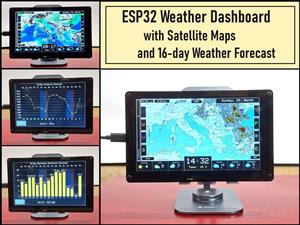 ESP32 Weather Dashboard with Satellite Maps and 16-day Weather Forecast
As you can see from my previous videos, besides Electronics, my fields of experimentation and proje...
ESP32 Weather Dashboard with Satellite Maps and 16-day Weather Forecast
As you can see from my previous videos, besides Electronics, my fields of experimentation and proje...
-
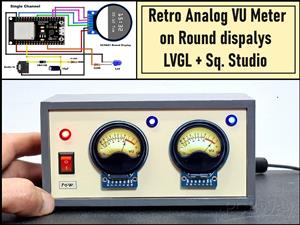 Retro Analog VU Meter on Round dispalys (ESP32 and GC9A01)
Recently, in one of my previous videos I presented you a Retro VU Meter project on round displays ...
Retro Analog VU Meter on Round dispalys (ESP32 and GC9A01)
Recently, in one of my previous videos I presented you a Retro VU Meter project on round displays ...
-
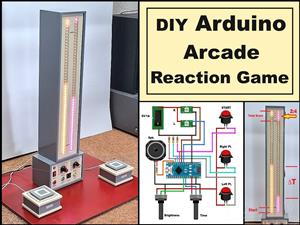 Ultimate 2-Player Reaction Timer with WS2812B LED Strips & Arduino
Arcade reaction game is a genre of play designed to test a player's physical response time and hand...
Ultimate 2-Player Reaction Timer with WS2812B LED Strips & Arduino
Arcade reaction game is a genre of play designed to test a player's physical response time and hand...
-
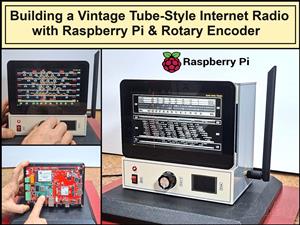 Building a Vintage Tube-Style Internet Radio with Raspberry Pi & Rotary Encoder
Internet radio (also known as web radio or net radio) is a digital audio service transmitted via th...
Building a Vintage Tube-Style Internet Radio with Raspberry Pi & Rotary Encoder
Internet radio (also known as web radio or net radio) is a digital audio service transmitted via th...
-
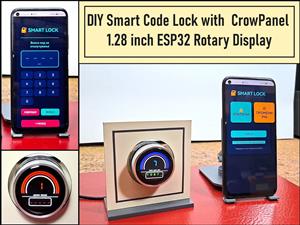 DIY Smart Code Lock with CrowPanel 1.28 ESP32 Rotary Display
A code lock is a keyless security device—either mechanical or electronic—that restricts access to d...
DIY Smart Code Lock with CrowPanel 1.28 ESP32 Rotary Display
A code lock is a keyless security device—either mechanical or electronic—that restricts access to d...
-
 SDR Panadapter for Vintage Tube Radios – Step-by-Step Tutorial
A radio panadapter (or panoramic adapter) is a device or software tool used in amateur radio and ot...
SDR Panadapter for Vintage Tube Radios – Step-by-Step Tutorial
A radio panadapter (or panoramic adapter) is a device or software tool used in amateur radio and ot...
-
 Oscilloscope Clock Simulation on a Round ESP32 Display
An oscilloscope clock is a circuit that turns an old analog oscilloscope into a stylish, retro-them...
Oscilloscope Clock Simulation on a Round ESP32 Display
An oscilloscope clock is a circuit that turns an old analog oscilloscope into a stylish, retro-them...
-
 DIY Simple GU32 Tube Stereo Amplifier (2x3W on 12VDC)
Vacuum tube amplifiers are often favored for their smooth harmonic distortion, especially in the low...
DIY Simple GU32 Tube Stereo Amplifier (2x3W on 12VDC)
Vacuum tube amplifiers are often favored for their smooth harmonic distortion, especially in the low...
-
 DIY 3-Display OLED Clock with Arduino and I2C Multiplexer
In this video I want to present you another unusual clock to add to my large collection of such DIY...
DIY 3-Display OLED Clock with Arduino and I2C Multiplexer
In this video I want to present you another unusual clock to add to my large collection of such DIY...
-
 Build a 5-Day forecast Raspberry Pi Weather Dashboard (Step-by-Step)
Recently in one of my previous videos,I introduced you to the 7 inch Elecrow Pi Terminal and how to...
Build a 5-Day forecast Raspberry Pi Weather Dashboard (Step-by-Step)
Recently in one of my previous videos,I introduced you to the 7 inch Elecrow Pi Terminal and how to...
-
-
ARPS-2 – Arduino-Compatible Robot Project Shield for Arduino UNO
2533 0 5 -
A Compact Charging Breakout Board For Waveshare ESP32-C3
2987 3 8 -
AI-driven LoRa & LLM-enabled Kiosk & Food Delivery System
3195 2 1 -
-
-
-
ESP32-C3 BLE Keyboard - Battery Powered with USB-C Charging
3263 0 2




















